URL parameters are pieces of data added to links. Usually, they contain important information for the website to get you exactly where you need, such as a search query or a specific YouTube video ID.
Recently, social media platforms have been generating a unique code every time you share a post, and appending that to the end. Continue reading for a full list of these platforms.
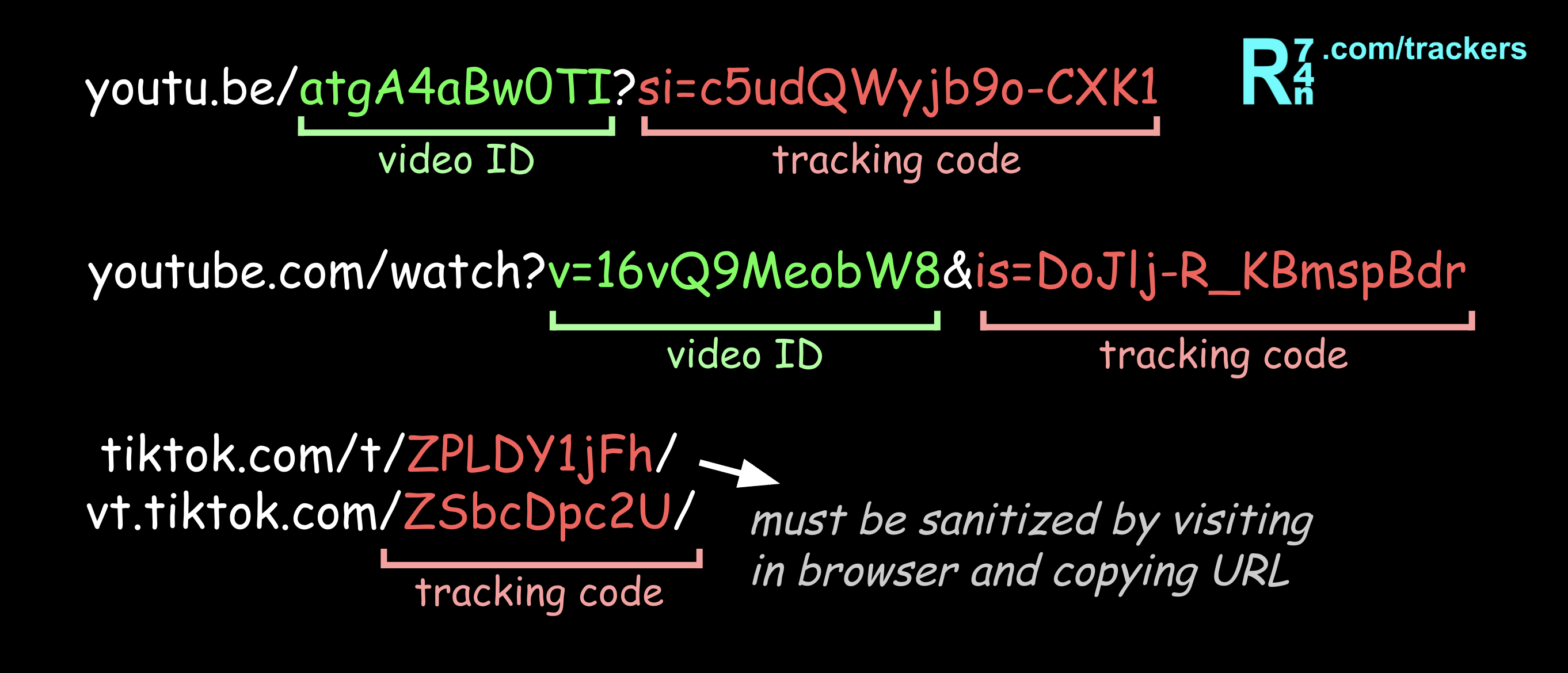
Using this, they track exactly who you send the post to, allowing them to build a social graph of all your friends, and associate your accounts across the web.
Not only is this creepy, it can also expose your personal profile without your knowledge. Some platforms use this data to suggest your account to the recipient. If you're hiding a secret identity from your family, for example, this is especially important.
The List
Jump to:
 YouTube
Associated with account and individual share:
YouTube
Associated with account and individual share:
- youtu.be/atgA4aBw0TI?si=c5udQWyjb9o-CXK1
- youtube.com/watch?v=16vQ9MeobW8&is=DoJlj-R_KBmspBdr
YouTube has been known to share your profile with the recipient unless disabled.
Associated with source location:- youtube.com/watch?v=16vQ9MeobW8&pp=sAQA
 Twitter / X
Likely associated with account or individual share:
Twitter / X
Likely associated with account or individual share:
- x.com/username/status/1739219362636581608?a=fYaD7o5f1JIjHDy2E0X
Associated with share method or device:
- x.com/username/status/1739219362636581608?s=20
- x.com/username/status/1730572934558869122?s=46
Associated with outgoing link:
- t.co/0955ZfGIE8
t.co codes can't be removed manually. Open the link in your browser, and copy the new link from the address bar.
 TikTok
Associated with account and individual share:
TikTok
Associated with account and individual share:
- tiktok.com/t/ZPLDY1jFh/
- vt.tiktok.com/ZSbcDpc2U/
- vm.tiktok.com/ZIJnhHxyU/
- www.tt.site/ZIJjDuLuS/
Can't be removed manually. Open the link in your browser, and copy the new link from the address bar.
TikTok shares your profile with the recipient, unless your account is private or you've turned this off in Settings, either:
Settings > Interactions > Display profile when sharing links,
or, Settings > Contacts and location > people who open or send links to you.
 Instagram
Associated with account and individual share:
Instagram
Associated with account and individual share:
- instagram.com/reel/Da5ZhfUbGsi/?srtk=MTU5eHseNjfLeDdoZg==
- instagram.com/reel/Da5ZhfUbGsi/?obrf=MTU5eHseNjfLeDdoZg==
 Facebook
Associated with account and individual share:
Facebook
Associated with account and individual share:
- www.facebook.com/share/r/19pKh6pENj/
Facebook
Associated with account and individual share:- www.facebook.com/share/r/19pKh6pENj/
Can't be removed manually. Open the link in your browser, and copy the new link from the address bar.
Associated with share method:- www.facebook.com/reel/2292819934384649?mibextid=wwXIfr
 Reddit
Associated with account and individual share:
Reddit
Associated with account and individual share:
- www.reddit.com/r/privacy/s/IZ08Z8p5xV
Can't be removed manually. Open the link in your browser, and copy the new link from the address bar.
Safe to share:- www.reddit.com/r/privacy/1x7id6h/post_title
 Pinterest
Associated with account and individual share:
Pinterest
Associated with account and individual share:
- www.pin.it/545LVBnm3 (Can't be removed manually. Open the link in your browser, and copy the new link from the address bar.)
- pinterest.com/pin/1152780883435713285/sent/?invite_code=9a5f5149d59da0a19f&sender=829688422100434808
Safe to share:
- pinterest.com/pin/1152780883435713285
 Spotify
Associated with account and individual share:
Spotify
Associated with account and individual share:
- open.spotify.com/track/37qtjAbhzMApJ2c6L19Bfm?si=QvtBgGxbRQm4XDW9CxE5Ng
Associated with share method:
- open.spotify.com/track/37qtjAbhzMApJ2c6L19Bfm?utm_source=copy-link
 LinkedIn
Associated with account and individual share:
LinkedIn
Associated with account and individual share:
- https://lnkd.in/p/eEJrHiEz
Spotify
Associated with account and individual share:- open.spotify.com/track/37qtjAbhzMApJ2c6L19Bfm?si=QvtBgGxbRQm4XDW9CxE5Ng
- open.spotify.com/track/37qtjAbhzMApJ2c6L19Bfm?utm_source=copy-link
LinkedIn
Associated with account and individual share:
- https://lnkd.in/p/eEJrHiEz
Can't be removed manually. Open the link in your browser, and copy the new link from the address bar.
Safe to share:- https://www.linkedin.com/posts/post_title-7515805774293439512-r4HL
 Google
Associated with account and individual share:
Google
Associated with account and individual share:
- share.google/ZA80YdjSIsaVEGH6b
- maps.app.goo.gl/TXpkcViksUSJAKLL9
Can't be removed manually. Open the link in your browser, and copy the new link from the address bar.
- www.google.com/search?kgmid=/g/11ph1yrw31&kgs=15b9a834d927a713
 Amazon
Associated with account and individual share:
Amazon
Associated with account and individual share:
- a.co/d/0ygOjtmX (Can't be removed manually. Open the link in your browser, and copy the new link from the address bar.)
- www.amazon.com/dp/B0BQPZPWMF?social_share=cm_sw_r_cso_cp_apin_dp_AN49WAGD7R4PYXP0NZW9
Safe to share:
- www.amazon.com/dp/B0BQPZPWMF
Good luck!
Missing a platform or format? Please submit it!
Here are some more tips:
- You can also remove any
?or&character if they are at the end, otherwise they may be necessary for the link to work. - Firefox has a "Copy clean link" feature that automatically removes useless parameters.
- On iOS, there are Shortcuts to sanitize TikTok links when sharing them.